


Refoto : AI Photo Studio
4.434.00 Reviews
App Specs
- Version
- 1.1.5
- Updated On
- License
- Free
- Downloads
- 10,000,000+
- Developer
- mAst App 2026
- Categories
- Photography
- Platform
- Android
Screenshots




 Analysis by AppCompare
I find that the most useful way to judge an AI photo editor is to start with the moment it can let you down: when you have a picture you like, but the result after editing looks less like the scene and more like a filter demo. Refoto: AI Photo Studio is aimed at quick improvements and creative portraits, so I’d treat it as a convenient option for everyday edits rather than a replacement for careful, hands-on photo work. That distinction makes it easier to decide when to trust its automatic touch and when to keep the original.
Where edits can go off track
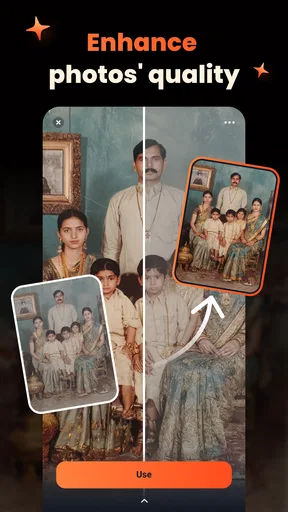
AI enhancement can make a photo feel clearer and more finished, but it cannot rescue every source image equally. A dim shot, a face softened by motion, or a subject blending into a busy background gives an automatic tool less reliable material to work with. I’d begin with the best-lit, sharpest version of a photo you have, then compare the result with the unedited image before saving or sharing it.
Background changes deserve an especially close look. Hair, glasses, loose clothing, and objects held near the body are the sorts of edges that can look unnatural after a cutout. For a profile image or a casual post, a small imperfection may not matter; for a product photo or a picture you plan to print, it can be distracting. I’d zoom in around the outline and choose a simpler replacement background when a complicated scene makes the separation look rough.
Another easy trap is applying several strong effects just because they are available. A filter, texture, and AI adjustment can each look appealing on its own, yet together they may flatten skin detail or push colors too far. My practical rule is to make one clear change at a time, check the whole image, and stop when the subject is easier to notice—not when every effect has been used.
Before you start editing
Refoto is a photography app from Waho Team. It is free to install, rated for Everyone, and currently at version 1.0.9, with Android support beginning at 7.0. It has a 4.5 average from around 27,000 ratings and over 10 million installs. Optional in-app purchases range from $3.99 to $29.99 per item, so I’d check the purchase details in the app before committing to anything beyond the free experience.
When an edit seems to stall or an image does not appear where you expect, I’d first check the basics: confirm that the picture is available on the device, make sure the app is current, and try again with a different image. If one particular photo repeatedly produces a poor result while another works, the file itself may be the issue rather than a general problem with the editor. Starting from a clear copy can also help you avoid losing the version you wanted to keep.
I like keeping an untouched original and treating the edited version as a separate result. That matters with AI changes because an attractive preview can hide a detail that only becomes obvious after you look at the image at full size. It also gives you an easy fallback if a background, portrait treatment, or color adjustment does not suit the photo after all.
Worth Reading Before You Choose

EA SPORTS FC Mobile 26 Is a Bigger Football Game, but It Takes Time

Flipboard Shows What News Apps Must Do Beyond the Feed

Switching to Android Auto Means Rethinking Your Driving Routine

Google Calendar Makes a Crowded Week Easier to Manage

Ludo King Makes the Most of the Minutes Between Plans

Baby Panda World Brings Quick Play to Modern Phones, but Its Game Library Feels Busy
Unleashing Creativity with AI Magic
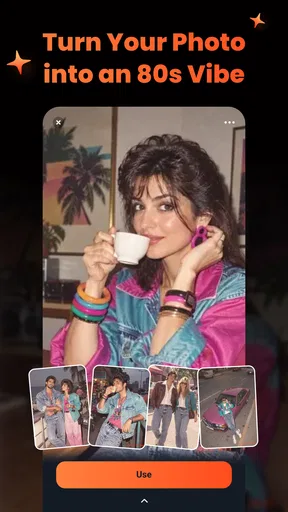
First things first, the app is all about using artificial intelligence to enhance your photography game. With Refoto: AI Photo Studio, you don’t need to be a pro to get pro-like results. The AI-driven tools automatically adjust lighting, enhance colors, and sharpen images to bring out the best in every snap. It's like having a smart assistant who knows exactly how to make your photos pop!
One of my favorite features has to be the AI-powered background remover. Have you ever taken a perfect photo, but the background just wasn’t right? With just a few taps, you can swap out dull backgrounds for something more exciting, without any of the usual hassle.
Filters, Effects, and More
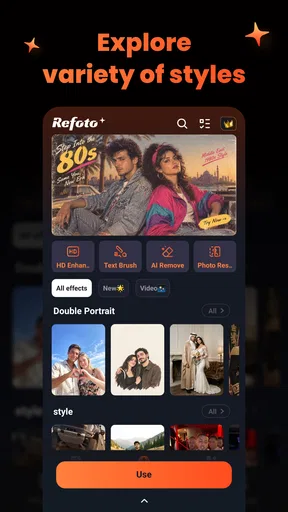
Filters are the backbone of any good photo editing app, and Refoto doesn’t disappoint. Whether you’re going for a vintage vibe or a modern look, there’s something here for every aesthetic. But what sets this app apart is the ability to stack and customize filters, giving you more control over the final look of your photos.
Beyond filters, there are tons of effects to play with. From light leaks to grain effects, each tool is designed to add a unique touch to your photos. Plus, the app’s intuitive interface makes it super easy to experiment and find the perfect combination that matches your style.
Choosing the right workflow
For a quick portrait before updating a profile, I’d try the AI treatment first, then decide whether the image needs any extra styling. For a group snapshot, I’d be more cautious: automated changes that flatter one face may not suit everyone equally. A light touch is usually safer when several people, different skin tones, or mixed lighting share the frame.
For an everyday example, imagine taking a picture of a handmade item near a window before listing it for sale. I’d start with the clearest shot, use enhancement only if the item looks dull, and try a background change only if the edges remain convincing. Then I’d check that the color still matches the real object. The convenience is useful, but faithful color matters more than a dramatic edit when someone needs to judge the item accurately.
This is where Refoto differs from a conventional editor. A manual editing app is often a better fit if you want precise control over individual adjustments or need a consistent look across a large batch of images. Refoto’s appeal is the shorter path from a picture to a more polished or imaginative result. I’d use it for one-off portraits and social posts, and reach for a more detailed editor when the image has to meet exact requirements.
When a problem is outside the editor
Not every disappointing result is caused by the app. A photo taken in poor light may already have lost detail, and an edit cannot reliably put that information back. Likewise, a background that is close in color to the subject can make separation difficult. If the same issue appears in different editing tools, I’d retake the picture in brighter, more even light or choose a simpler setting before spending time repeating the edit.
If the app itself behaves unexpectedly, I’d avoid making several changes at once. Try a fresh copy of the photo, close and reopen the editor, and test a simpler edit. This makes it easier to tell whether the difficulty follows a particular image or happens more broadly. I would not assume that reinstalling or changing settings will fix a one-photo problem; first check the source image and preserve the original.
Who will get the most from it
I can see Refoto suiting someone who wants approachable AI portraits, quick cleanup, and playful effects without learning a complicated editing workflow. It is also a reasonable place to experiment if you tend to share individual pictures rather than process a full camera roll. The free starting point lowers the commitment, while the optional purchases are worth reviewing if a tool you want turns out to be paid.
I’d skip it as my main editor if I needed detailed control, dependable batch consistency, or a strictly realistic finish on every image. People who are sensitive to changes in facial appearance should inspect AI portraits carefully before using them publicly. And if the aim is simply to crop, straighten, or make a tiny exposure correction, the phone’s built-in photo editor may be quicker than opening a separate app.
Why Users Love It
What really stands out about Refoto: AI Photo Studio is its user-friendly design. Even if you’re not tech-savvy, you’ll find the app easy to navigate. The learning curve is practically non-existent, which means you can start editing and sharing stunning photos almost immediately.
Moreover, the app has a community feature where you can share your creations and get inspired by others. It’s like a social network for photo lovers, where you can connect, learn, and grow your skills.
For me, that approachable feel is most valuable when I already know what I want to change but do not want to spend time adjusting lots of separate controls. The trade-off is that easy automation can encourage edits that look impressive at first glance but do not suit the subject. I’d treat the tools as suggestions, not as a reason to assume every image needs more processing.
Wrap-Up: Is It Worth It?
In a nutshell, Refoto: AI Photo Studio is an impressive tool that brings a professional touch to your photos. Whether you’re looking to enhance personal photos or create content for social media, this app has got you covered. The combination of AI technology, user-friendly interface, and creative freedom makes it a standout choice in a crowded market.
So, if you’re ready to take your photography to the next level, give Refoto a try. Who knows? You might just find your new favorite editing app!
My practical verdict
I’d recommend Refoto to a friend who wants fast, approachable ways to refresh portraits and make individual photos feel more finished. Its strongest case is convenience: try an AI-led adjustment, see whether a background or effect improves the image, and keep the result only if it still feels like the moment you photographed. For everyday sharing, that can be enough.
I would not choose it blindly for important commercial images, exact color matching, or a polished series that must look consistent from frame to frame. In those situations, a more controlled editor—or a new photo taken in better conditions—gives you a safer route. Overall, I see this as a useful creative sidekick, not a universal fix: start with a good source image, edit conservatively, and keep the original close by.
Pros
- Intuitive user interface for easy navigation.
- Advanced AI enhances photo quality effectively.
- Wide range of filters and editing tools.
- Quick processing time for edits and exports.
- Supports high-resolution image outputs.
Cons
- Occasional bugs with some editing features.
- In-app purchases required for premium tools.
- Limited free version capabilities.
- Requires internet connection for AI features.
- Some filters can be too aggressive.
FAQs for Refoto : AI Photo Studio
What is Refoto: AI Photo Studio used for?
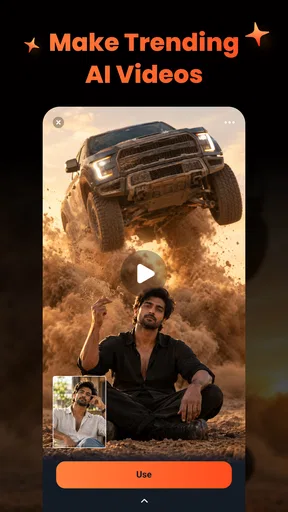
Refoto: AI Photo Studio is a powerful application designed to enhance and transform your photos using advanced AI technology. It offers a range of features, including automatic retouching, background removal, and artistic filters, making it a versatile tool for both professional photographers and casual users looking to elevate their images.
Is Refoto: AI Photo Studio easy to use for beginners?
Absolutely! Refoto: AI Photo Studio is designed with user-friendliness in mind. The intuitive interface and guided tutorials make it accessible for beginners, while still providing advanced features for experienced users. With easy-to-navigate menus and straightforward controls, anyone can enhance their photos with minimal effort.
What are the key features of Refoto: AI Photo Studio?
Refoto: AI Photo Studio offers a variety of features including AI-driven enhancements, background removal, artistic filters, and a range of editing tools such as cropping, brightness adjustments, and color correction. It also provides batch processing for handling multiple images at once, making it a comprehensive photo editing solution.
Does Refoto: AI Photo Studio require an internet connection?
While Refoto: AI Photo Studio can perform basic photo editing offline, an internet connection is recommended for accessing its full range of AI features and updates. Online connectivity ensures that users receive the latest enhancements and improvements, as well as the ability to share edited photos directly to social media platforms.
Is there a cost associated with using Refoto: AI Photo Studio?
Refoto: AI Photo Studio offers a free version with basic features, but to unlock the full suite of advanced tools, a subscription or one-time purchase may be required. Pricing options are flexible, catering to both casual users who need occasional edits and professional users who require extensive photo editing capabilities.


